
Instagram Account App
The Instagram Account app displays posts from a connected Instagram account on your screens.
When you add and setup an app to a playlist, it appears as a scene.
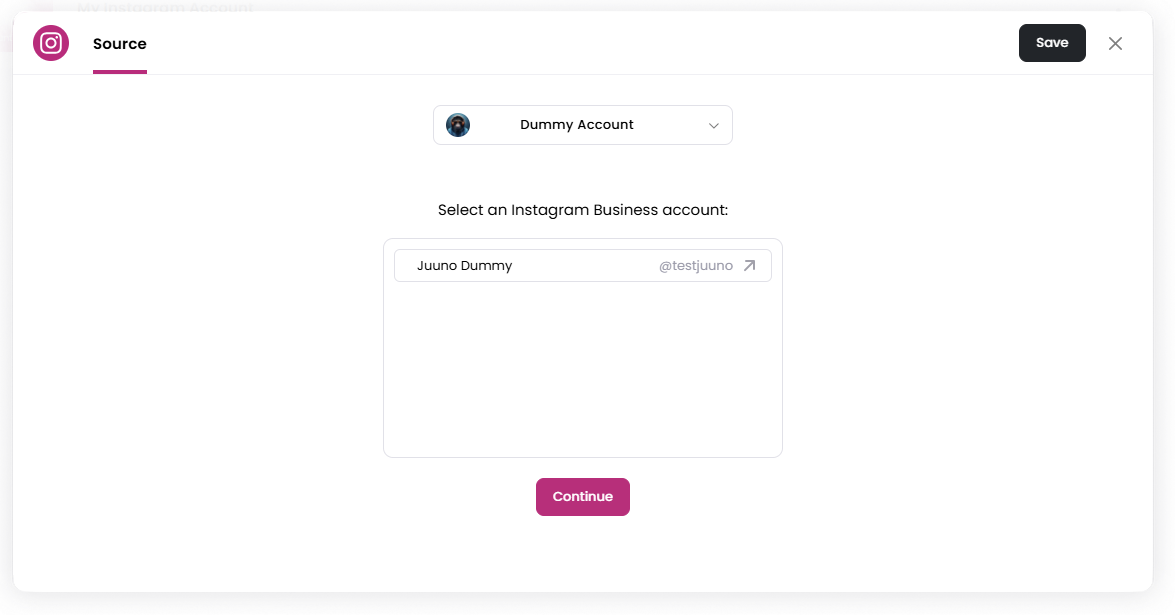
To use this app, you must connect an Instagram account to Juuno and select the account you want to display posts from.
Connect an Instagram Account
Add the Instagram Account app to your playlist.
In the Source tab, connect your Instagram account and grant all permissions. (skip to
Step 4if already done)After connecting, you will be redirected back to Juuno.
Select the Instagram account you want to display.
Click Continue.
This app requires an Instagram Business or Creator account linked to a Facebook Page. If you haven't set this up yet, see the Instagram Hashtag Feeds setup guide for prerequisites and troubleshooting.
Moderate Posts
The Moderate tab allows you to review and control which posts appear on screen.
Options include:
Manually approve new posts — New posts must be approved before appearing publicly.
Auto-approve new posts — New posts automatically appear.
You can also filter posts by:
All
Needs Approval
Approved
Rejected
Style Settings
The Style tab controls how posts appear on screen.
Display Language Select the language used for the post display. Currently, English (en) is supported.
Post Duration (Seconds) Set how long each post appears before switching to the next post.
Show Post Caption Toggle whether the Instagram caption appears with the post. If disabled, the caption will be hidden.
Font Choose the font used for the post text.
Text Colour Choose the color used for the text.
Background Colour Choose the background color behind the post.
Fit Controls how post images and videos fit on the screen.
Transition Speed Controls how quickly posts transition between each other.
Randomize Order Display posts in a random order instead of chronological order.
Hide UI Text Hide interface elements such as timestamps.
Set the Scene Duration
After saving the app, you can adjust how long the scene stays in the playlist.
In the Playlist, find the Instagram scene.
Click the duration value (for example,
00:30) to set how long the scene plays.00:30means the scene will play for 30 seconds.
Notes
An Instagram Business account must be connected before selecting posts to display.
Only posts from the selected account will appear.
New posts will appear automatically depending on the Moderate settings.
Currently, English is the only supported display language for social apps.
For help setting up an Instagram Business account or troubleshooting connection errors, see the Instagram Hashtag Feeds setup guide, which covers business account requirements and Facebook Page linking.